Imagine managing your address book, juggling client data and attending to ongoing service matters or support issues can leave you wishing you had at least one extra pair of hands. Xtelsio CTI client makes sense to port some of that work onto computers.
Xtelsio CTI (Computer Telephony Integration) client is kind of software enabling PC-directed control of desktop phones and address book data, which allows people control their phone communication and handle calls simply by mouse clicks. It’s possible to dial telephone numbers from within other applications through an integrated TAPI connector. Yeastar S-Series PBX supports such an interface which can allow the xtelsio CTI client access. Yeastar S-Series VoIP PBX combined with xtelsio CTI client provides the software solution that can automate much of the misery, leaving you free to make your call with a single click.
Yeastar S-Series PBX has been tested with xtelsio CTI Client version 3.x. Before configuring, make sure you have installed the CTI client. Download xtelsio CTI Client version 3.x.
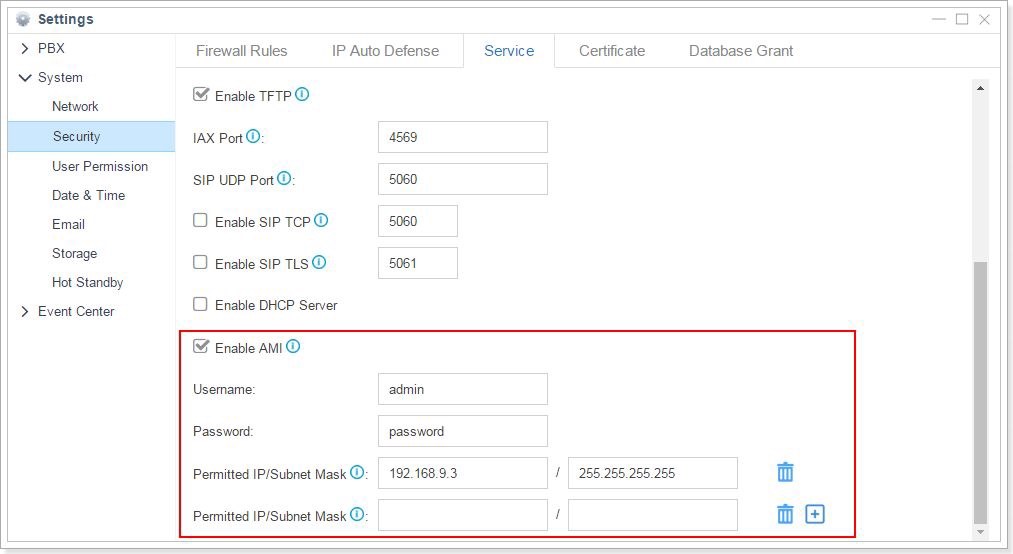
Step 1. Enable AMI (Asterisk Manager Interface) on Yeastar S-Series PBX.
Step 2. Configure TAPI device on xtelsio CTI Client.
Xtelsio CTI client has an integrated Asterisk Connector to monitor and control S-Series VoIP PBX.
More configuration details can be found here.
Related:
Yeastar also supports AsterSwitchboard CTI Integration, an operator panel for Asterisk PBX phone system running on MS Windows clients. The CTI solution will allow you to call, answer, transfer, view the status of all connected extensions, intercept a call for another extension, display name and number of incoming calls, make a call directly from the integrated list of contacts or from the log and much more… Everything in just one click to improve your customer experience and satisfaction.
Learn how to integrate AsterSwitchboard CTI Operator Panel with Yeastar S-Series PBX here.
In addition to the plain CIT integration support, Yeastar also boasts seamless integration with mainstream 3rd-party CRM and call center software, where computer telephony integration technology comes in full swing. Learn what contact center applications are supported here.
BILLINGS, Mont/ Xiamen, China– April 20, 2026—Clearfly Communications (www.clearfly.net) today announced a new strategic partnership…
BILLINGS, Mont/ Xiamen, China– April 20, 2026—Clearfly Communications (www.clearfly.net) today announced a new strategic partnership…
The AI Receptionist, released with the P-Series V23.3 BETA, marks a significant expansion of our…
P-Series Updates: AI Receptionist, Custom Call Report and More The AI Receptionist, released with the…
Another major update for P-Series PBX System is here! Check out what’s new and what’s…
Microsoft Teams has seen tremendous growth for the past few years, developing an enormous customer…
View Comments
I need a qoute os the licence
Hello, i really hope this blog is still working, because i cannot find the answer elswhere: my S20 pbx had to be reset, so the tapi connection has disturbed. I do not know what username and password has to be filled in, and what the consequenses are for other devices. Can you help me with it?
frreg. Henk
Hi Henk,
Please click here to submit a support ticket. Our technical team will reach back to you.